Biodata Declaration Format: The Exact Line and Text to Copy
The declaration is four lines at the bottom of a biodata that most people copy without reading. It is also the part offices check first for a signature, and an unsigned biodata is routinely handed straight back.
When this format is the right one
Every biodata ends with one. Private employers treat it as a formality; government departments, banks and educational institutions treat it as a signed statement of fact attached to your personnel file, and use a longer wording that carries consequences.
The declaration line. Copy any of these
Pick the one that matches where you are applying, and type it at the end of your biodata above the place, date and signature. The wording is conventional, so there is nothing to gain by rephrasing it.
Standard declaration line (private companies, walk-ins, clerical posts)
- I hereby declare that the information furnished above is true to the best of my knowledge and belief.
Government and PSU declaration text
Departmental formats expect the second sentence. Leaving it out makes the document look incomplete on a file.
- I hereby declare that all the statements made in this bio-data are true, complete and correct to the best of my knowledge and belief. I understand that in the event of any information being found false or incorrect, my candidature is liable to be cancelled.
Fresher variant
Identical in substance: useful when the biodata carries training and project detail rather than employment history.
- I hereby declare that the particulars given above are true and correct to the best of my knowledge and belief, and that I have not withheld any information.
Experienced variant
For a biodata that lists previous employers; it confirms the work history as well as the personal details.
- I hereby declare that the details of my education and work experience given above are true and correct to the best of my knowledge and belief, and I will produce the original documents whenever required.
Self-declaration with your name
Some offices ask for a "self declaration" in the first person with the full name, especially on forms.
- I, [Full Name], son/daughter of [Father's Name], hereby declare that the information given in this bio-data is true and correct to the best of my knowledge and belief.
Line for attached documents
Add it below the declaration when you enclose photocopies of certificates.
- I further declare that the copies of the documents enclosed are self-attested and are true copies of the originals.
Short line for a simple biodata
- I declare that the details given above are true to the best of my knowledge.
Hindi declaration line
Accepted where the rest of the biodata is written in Hindi. Do not mix the two languages in one document.
- मैं घोषणा करता/करती हूँ कि ऊपर दी गई समस्त जानकारी मेरी जानकारी और विश्वास के अनुसार सत्य एवं सही है।
How the block is laid out
The declaration runs as a full-width line. Place and date go on the left, your signature on the right, on the line below, and the signature must be in ink on every printed copy. A typed name where a signature belongs is the most common reason a biodata is handed back at the counter.
- Place: ______________ (Signature)
Date: ______________ Your Name
Sample Biodata Declaration format
Plain text you can copy straight into Word. Replace the values and the structure keeps working.
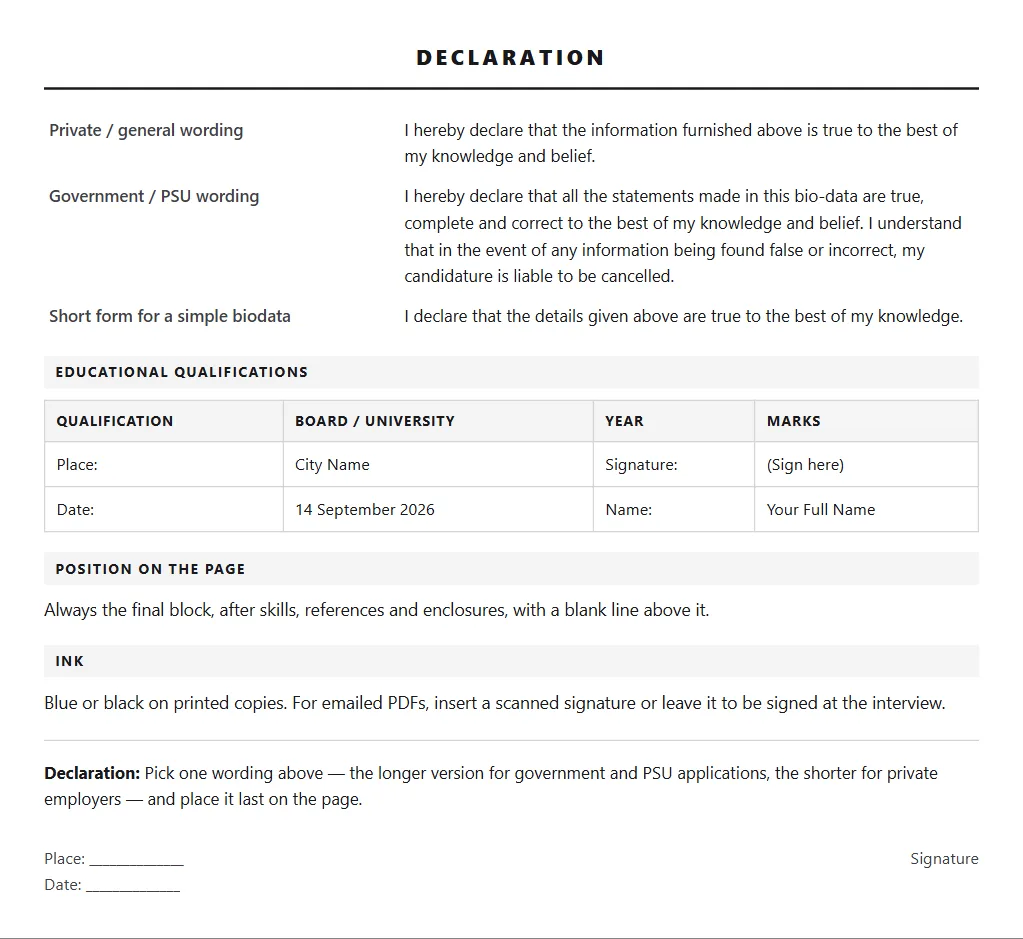
| Private / general wording | I hereby declare that the information furnished above is true to the best of my knowledge and belief. |
| Government / PSU wording | I hereby declare that all the statements made in this bio-data are true, complete and correct to the best of my knowledge and belief. I understand that in the event of any information being found false or incorrect, my candidature is liable to be cancelled. |
| Short form for a simple biodata | I declare that the details given above are true to the best of my knowledge. |
| Qualification | Board / University | Year | Marks |
|---|---|---|---|
| Place: | City Name | Signature: | (Sign here) |
| Date: | 14 September 2026 | Name: | Your Full Name |
Always the final block, after skills, references and enclosures, with a blank line above it.
InkBlue or black on printed copies. For emailed PDFs, insert a scanned signature or leave it to be signed at the interview.
Date: ______________Signature
Applying somewhere that wants a resume instead? Get yours scored out of 100 free and rebuilt across 15 templates.
Check my resume freeSection by section
"I hereby declare that the information furnished above is true to the best of my knowledge and belief." This is the version used for private company applications, walk-ins and most clerical posts. It is short, it is expected, and nothing is gained by rewriting it in your own words.
"I hereby declare that all the statements made in this bio-data are true, complete and correct to the best of my knowledge and belief. I understand that in the event of any information being found false or incorrect, my candidature is liable to be cancelled." Government and PSU formats expect this fuller version. The second sentence is the part that matters to them, and leaving it out makes the document look incomplete on a departmental file.
Always last, after every other section, with a blank line above it. Never place it in the middle of the document or alongside another section: a reader looking for the signature expects to find it at the bottom left and bottom right of the final page.
Place on the left, date below it, and your signature on the right, roughly two lines below the declaration text. Print your name under the signature line. Sign in blue or black ink on printed copies; for an emailed PDF, either insert a scanned signature or type your name and leave the signing for the interview.
What to get right
- Do not rewrite the declaration in your own phrasing. It is a conventional form of words, and an unusual version draws attention for the wrong reason.
- Use the longer wording for any government, PSU or bank application. The clause accepting cancellation is exactly what those formats are looking for.
- Sign it. An unsigned biodata is the single most common reason a file is handed back across a counter, and it happens to people whose document was otherwise perfect.
- Put the date you are actually submitting, not the date you typed the file. Offices notice a declaration dated three months earlier.
- Print your name below the signature line. Many signatures are not legible, and the personnel clerk filing your sheet needs to read the name.
CVCrisp Jobs: new job postings every morning in one locked Google Sheet, each with a link to apply on the employer's own page. Get the sheet in our WhatsApp community. Looking in Mumbai? See ITI jobs and BPO jobs in Navi Mumbai.
Join on WhatsAppHow the job sheet worksNo job or interview guarantee. We never ask for a fee to get you selected.
Common questions
What is the correct declaration for a biodata?
For private employers: "I hereby declare that the information furnished above is true to the best of my knowledge and belief." For government, PSU and bank applications, use the longer version that adds that you understand your candidature is liable to be cancelled if any information is found false. Both are followed by place, date and signature.
Biodata me declaration kaise likhe? (How do I write the declaration in a biodata?)
Biodata ke last mein, sab sections ke baad, ek line likho: "I hereby declare that the information furnished above is true to the best of my knowledge and belief." Uske neeche left mein Place aur Date, right mein signature aur apna naam. Government form ke liye lambi wording use karo jo upar di gayi hai.
Is the declaration compulsory on a biodata?
In practice, yes. Offices that work from biodata treat it as a signed statement and frequently return files that arrive without one. Even where nobody checks, it takes four lines and its absence is noticeable to anyone used to reading these documents.
Where exactly should the declaration go?
Last on the final page, after every other section including enclosures and references, with a blank line above it. Place and date go on the left, signature on the right about two lines below the text, with your printed name under the signature.
How do I sign a biodata that I am emailing?
Either insert a scanned or photographed image of your signature into the document before exporting to PDF, or type your name in the signature position and sign the printed copy you carry to the interview. Do not email an unsigned Word file to a government office. Send PDF so the layout and the signature image cannot be altered.
What is a self declaration in a biodata?
A first-person declaration that names you, for example: "I, [Full Name], son/daughter of [Father's Name], hereby declare that the information given in this bio-data is true and correct to the best of my knowledge and belief." Some offices ask for this form; it is followed by place, date and signature.
CVCrisp builds an ATS-ready resume and an editable Word copy: free to use, and you only pay when you download.
Start free